Open Beta
Watson is open.
Anyone can sign up from our site and start working right away. There’s no waitlist or access code. Early Studio subscribers get founding-member pricing for as long as they stay.
Start your next creative project
- Start your next creative Project with a template. Photography Shoot, Video Production, and Motion Design join the built-in Project templates. Choose the one that fits your next job and make it your own.
A faster Work tab
Table, Board and Timeline share one view, with right-click menus, multi-select bulk actions, delete with Undo and “Show more” for long lists. The Timeline shows who’s working on what, with their names and photos.
- Manage several Projects at once. Select Projects in the table and use bulk actions to handle updates together.
Give each teammate a clear role
- Give each Project teammate a clear role. Manage Workspace and Project roles separately, with one role for each teammate on a Project. Reassign unfinished Action Items when removing a teammate to keep work moving.
See your Network the way you work
- See your Network the way you work. Browse People in a table or board, group contacts by Organization, and return to the same sorting, grouping, and layout after a reload.
Keep client work close
- Keep client work close. Switch clients from the Portal sidebar, preview a client before their first active Project, and message Portal clients directly from Studio.
A notification bell that knows your schedule
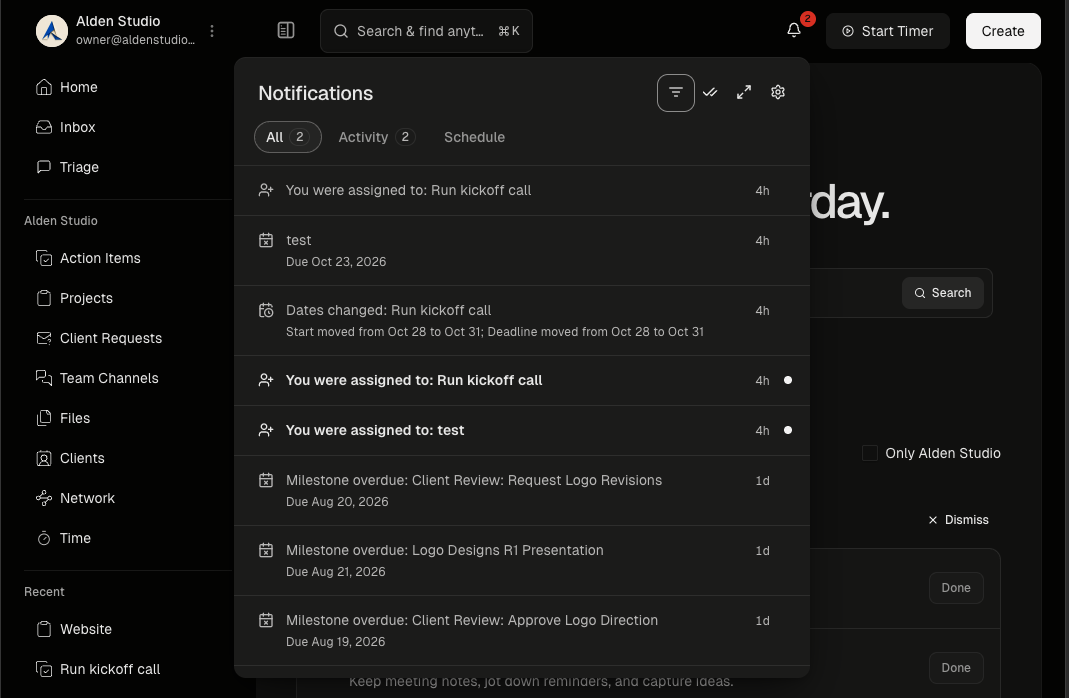
Project leads and assignees hear about work that’s due soon, dates that moved, work that’s unblocked and milestones that slipped. The bell has All, Activity and Schedule tabs. On the notifications page you can mark items read or unread, snooze them, archive them with Undo, and act on several at once.
Checkout and subscriptions
Studio checkout now runs on Watson’s own page. If someone referred you, open their link or enter the code under “Have a code?” Watson compares the code with your founding-member discount and applies whichever saves you more over your first year.
- Stay on top of Workspace subscriptions. When a renewal needs attention, billing managers receive a notice with options to pay the invoice or update the Workspace’s payment method.
Everyday improvements
- Keep working in a smaller window. Upload, New Note, Start Timer, Create, and the Resources toolbar stay within reach when you narrow your window.
We’ve also refined everyday details across Watson, including clearer upload and invitation messages, calendar navigation, and page spacing. Project date pickers now open on the month you’ve already selected.