Projects that plan ahead
A new Work view for every project, schedule checks that suggest fixes, and project templates.
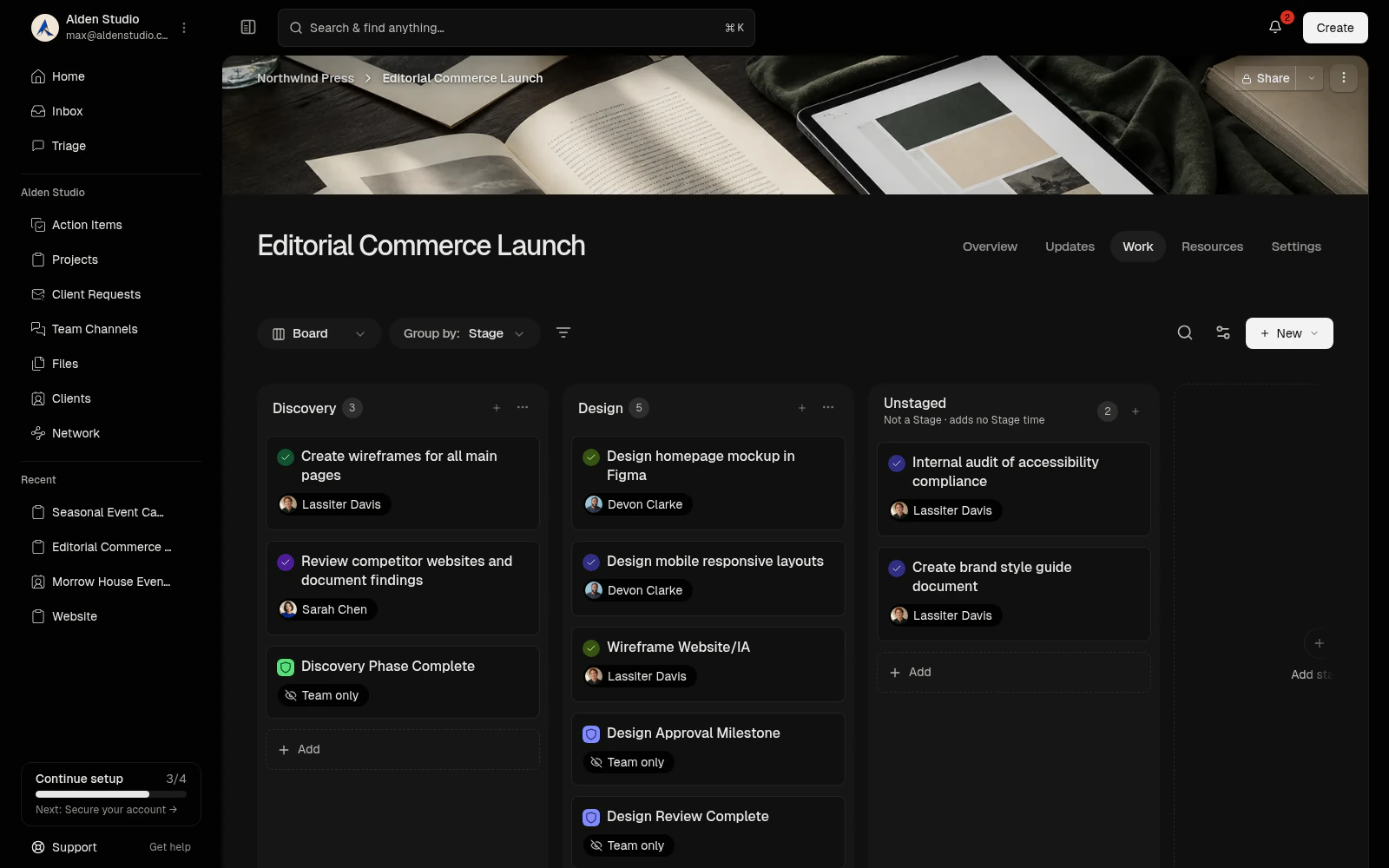
All your project work in one view.
Every project now has a Work tab that brings its tasks and milestones together. Switch between a table, a board and a timeline, whichever suits the moment. Drag tasks and stages into the order you want.
A timeline that keeps you honest.
Watson checks your schedule as you plan. It flags tasks without dates, work set to start before the task it depends on is finished, and projects running past your client’s deadline. Each issue explains what’s wrong, and where it can, Watson suggests a new date you can apply right away.
Plan together without stepping on each other.
When a teammate changes the same work you’re rescheduling, Watson updates your view so you’re always working from the latest plan.
Start from a template.
Kick off a project from a built-in template, or turn one of your own projects into a template. Copies keep your stages, tasks and milestones in order, so every new project starts the way you like to work.
Your Portal, organized around each client.
We’ve refined the Client Portal permissions to make it even easier to navigate and preview. Everything you share with clients lives there: their projects, requests, files and conversations.
More control over how you work with clients.
For each person at a client, you decide which projects they see and what they can do, including who can approve work and review files. Reviews and approvals happen right in the Portal, so sign-off stays next to the work it’s about. View as client shows you the Portal exactly as that person sees it.
Plus lots of small fixes and polish:
Always on the latest version. When we ship an update, Studio offers a one-click reload, so open tabs never fall behind.
Smoother client previews. The preview banner sits neatly above the Portal, and ending a preview takes you back to the page you started from.
Smarter @mentions. Suggestions offer only people who can see the conversation.
Clearer project updates. Update cards in the client Portal show their comment counts, and milestone conversations open in their project.
Tidier workspace library. Review requests appear only on project resources, where they belong.
Smarter emoji replacement. Typed smileys turn into emoji only when they stand alone, so ordinary words stay as you wrote them.
Helpful explanations. When Studio can’t complete an action, it now tells you why.
Better Help Center search. Searching also matches section headings, hides empty sections, and announces results to screen readers.
Personalize your workspace. Portal sign-in pages in the new Design Studio, with a history of saved changes.
Choose primary contacts independently for each client and project.
Remove client contacts while preserving their Network records and Portal access.
See what’s due today with labels that follow your local date.
Keep project Work lists tidy, with subtasks grouped under their parent.
Send milestone approval requests to eligible teammates, directly in their Inbox.
Archive a client relationship independently, then restore access without losing history.